SecretAgent Mobile: Pocket PC Memories
(This blog originally drafted in 2012)
Developing this application for the Pocket PC device was a first attempt to do embedded device programming. This meant there was a lot of memory to abuse and waste. In addition, if it wasn't good at releasing memory or ended up referencing bad pointers than the software would crash which on the device causes it to hang.
C++ was the primary language which means allowed class programming skills to simplify all the overhead is handled properly. The visual framework was somewhat forcefully Microsoft Foundation Classes meaning software needed to be divided up into the proper classes to facilitate easy to build ad troubleshoot. The document view architecture was also forcefully used but this positively allows logic classes separate to be isolated from the user experience classes.
To keep memory use as small as possible there are only a small group of options that are required which can be modified by the user. Most of these are stored as numeric values so it doesn't require many bytes to keep the dozen or so options around. The area that needed to be optimized was the class that is the engine for Certificate management. An instance of this class is needed anytime the certificate dialog, the recipient management window (also known as Certificate Explorer window) or a vault window is open. Most of the application requires this core class and functionality so the application creates one and only one instance of the class. While the class is loaded memory is kept to a minimum by only have references to the actually certificates and only loading a certificate on demand.
Most of the other memory requirements are handled in the cryptographic engine which is another corporation's intellectual property and therefore outside the scope of this blog post.
Creating the New User Experience
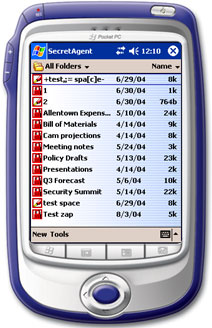
One of the problems of the main screen from the previous prototype was it did not conform to standard Windows CE application guidelines. CE applications first present the user with a file open window which is simply a list of files created by the application. If there are no files to display the application opens to a screen that allows the user to create a new file.
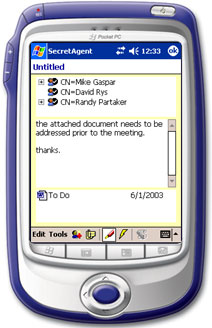
Both opening an existing file or creating a new file takes you to a window that allows you to view the important information of the data vault. Considering that these vaults are encrypted for a select group of people, contain a secure message and include any number of files to attach it only seems appropriate to model the window off of a traditional e-mail application.
The main menu was simplified to get users to two other important areas of the application one of which is the configuration panel. This is modeled off of the Windows control panel where in hindsight the more traditional settings model should have been used. The decision to mimic control panel was made as most of the desktop users were already familiar with it. Beyond that was an engineering decision. At the time not all settings used an easy flow of standard widgets and a concern of too much noise resulting from such diversity in a single dialog could have resulted in unnecessary complexity. The control panel approach allowed for grouping and deemed the best presentation to the user.
While all these different objectives were developed it was important to stayed true to the Pocket PC user interface requirements. This means obeying all the little details as to what can and cannot be shown on a toolbar, displaying the proper help information when selected from the start menu and what controls must do when the keyboard is displayed. The positive result from this experience is that validation from receiving the "Designed for Pocket PC" logo which can be used on all technical and marketing materials. For the software owners, this makes their SecretAgent Mobile product the first application to receive any certification for being designed for the target operating system.
Minimizing User Interaction
Pocket PC devices seem to be a convenience for the simple tasks when a standard notebook is overkill. While a master's candidate at DePaul, after night class we would head over to a nearby hotel bar for drinks. Being situated near the convention and meeting halls we found ourselves in the company of many a business person at these late hours. It is here that I have seen the Pocket PC devices being used. Watching the use of the infrared port to send data from one device to another provided the inspiration of the direction Pocket PC software needs to go.
If these devices were primarily used on the road such as travel at airports, planes, meetings, and drinking after the meetings then the typical user of these devices will want to read or enter the information they need and then move on. The trick here is the user cannot be burdened with details. Borrowing a phrase from pinball machine programmers the design of the product should be tailored for the drunks in the bars. A couple of goals resulted from these observations:
- Any interaction the user needs to have should be done primarily with screen taps and not require a lot of data entry.
- The software is going to have to do much of the work and avoid prompting the user unless it is absolutely necessary.
Combining both these goals contributed to automation. Once a vault is open in the view it became easy to keep track of what files are open and modified creating the ability to re-encrypt data when the user closes the window. Due to the device's small size the risk of a device being lost or left behind is extremely high thus the primary purpose of having this software on the device is to make sure files cannot be recovered when in the wrong hands. The automatic re-encryption is a feature that never appeared in the SecretAgent product line until the Pocket PC build.
To simplify input, the software provides the user tables of options as the primary selection input. The benefit to this is twofold. First, for a Pocket PC device the user can just tap on the option they want. Second, because the table only contains valid options there is a reduction to the possibility for user error. A side effect or providing tables of information for the user to tap on is the elimination of the need to display the on screen keyboard which also yields more screen real estate.
Certificate Management Lessons Learned
The Certificate Explorer application, is a component for the company that I had been Dev Owner since inception. A certificate is the X.509 certificate and optionally a private key associated with the certificate. Categories groups certificates for certain devices or communities. All certificates must be a member of a category so in some instances a general category is used as a default catch all. A container is the physical location the categories are stored. Each container implements its own interface providing an abstraction for the software encapsulating the physical requirements for the certificate storage and retrieval.
The goals when creating the new Certificate Explorer was to accomplish two primary objectives, reduce the amount of screen required to create address books and give it some of the qualities that would be added to the application going forward. The application is divided up into three areas, the location of the certificates (people) you are looking up, grouping the certificates into communities and, of course, the certificates themselves. The vertical nature of the screen orientation required one modification to the Pocket PC software to display the data vertically.
Presenting this architecture made use of tabs to show the different container locations. When the user selects a container the category view is populated with the groups available. When the user selects a group the final widget is populated with the contained certificates. It’s a bit of deep dive but the challenge exists that certificates at the time were required to be presented in a particular manner. The result became going forward that certificates, which are the main component of PKI based security products, need to be better integrated into the experience and less like a management tool.
Saying Goodbye to SecretAgent Mobile
Developing on the Pocket PC has ups and downs. A good positive note is that the operating system itself (Windows CE) is so new that it is actually done right. It is a Unicode only system so it has internationalization built in. It has only the required kernel functions allowing the OS to occupy as little space physical resources as possible. Most importantly each API call is fast and efficient.
The items that gave me the most grief was trying to debug on the device. The debugger on the desktop machine needed to communicate with a remote process on the device and this communication at times was slow. The reason so much debugging was required is while the operating system was well implemented the port of Microsoft Foundation Classes was full of bugs. There are many classes in which sub classing was required as the MFC classes didn’t implement the functions to behave properly.
After all this hard work the future of this particular product isn't that bright. Hand held devices don't appear to be the rage that the once were pictured as being. The devices seem to be used in more application specific rollouts such as inventory applications and GPS applications. The software that is designed for the devices is still limited. The standard device comes with stripped down versions of Outlook, Word and Excel. Our company was invited to participate in a competition for the best Pocket PC applications being brought to market. The winning software application was a student academic progress tracker that allowed students to keep track of grades, homework assignments and courses registered.
While this product is now lost in the vaults of time, the streamlining of the user experience continues forward. Focused on looking at understanding workflow as opposed to organizing interfaces by container and object types will improve the overall experience. The tech was cool but the real fun came from understanding the human component to how the tech would fit into daily life. If only the technology received enough demand to see what the next iteration would have produced. That will happen on the desktop and web apps now. If you find yourself appreciating a workflow based experience, thank Pocket PC for planting those seeds.